


BlackVue
3.4953.00 Reviews
App Specs
- Version
- 4.29
- Updated On
- License
- Free
- Downloads
- 1,000,000+
- Developer
- pittasoft
- Categories
- Maps & Navigation
- Platform
- Android
Screenshots
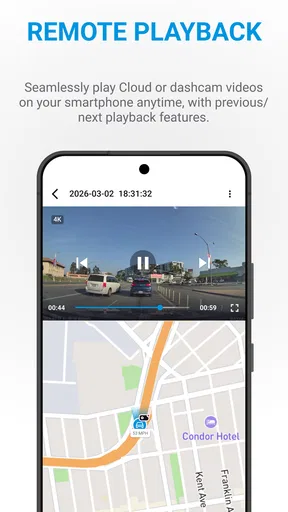
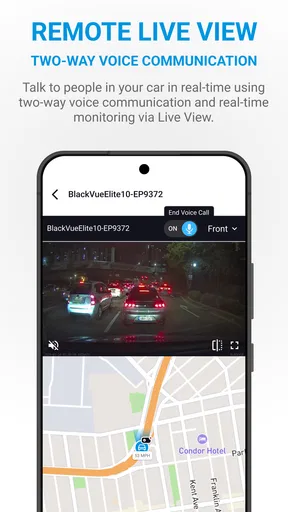
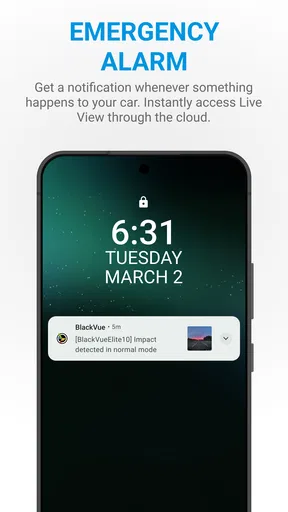
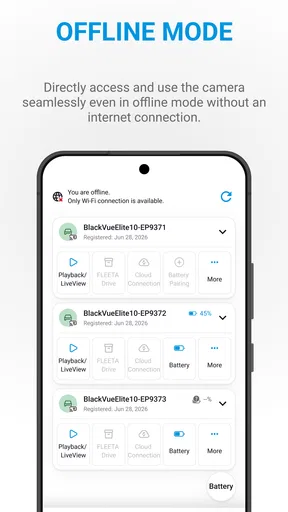
 Analysis by AppCompare
I see a dashcam companion as a tool for a specific moment: something happens on the road, and I need to get from the camera’s recording to a useful clip without wasting time. BlackVue is designed for owners of pittasoft dashcams, with cloud access among its central ideas. That makes it different from a general navigation app: it is not meant to plan a route or replace a map, but to help me check and manage the view from a compatible camera.
Start with the camera, not the phone
The first practical question is whether this fits the equipment already in your car. BlackVue is most relevant if you own a compatible BlackVue dashcam and want a phone-based way to interact with it. Without that camera, the app has little reason to be part of your everyday routine. I would check compatibility and the camera’s connection options before installing, rather than assume that any dashcam can pair with it.
That distinction also sets expectations. A phone can record video on its own, but it does not offer the same fixed, vehicle-mounted perspective as a dashcam. Conversely, the companion app depends on the camera and its setup; it is not a standalone driving recorder. If you are shopping for a complete system, think of the camera and app as parts of one workflow, not two interchangeable products.
From a quick check to a useful recording
In an everyday situation, I might return to a parked car and notice a scrape or a new mark. The useful sequence is to open the app, connect to the dashcam in the way the particular setup supports, find the relevant recording, and review it while the event is still fresh in my mind. If I need to preserve a clip, I would deal with that promptly rather than leave it buried among later recordings.
A small habit makes this process less stressful: note the approximate time and where the car was parked as soon as I notice a problem. That gives me a narrower window to inspect instead of scrolling through unrelated footage. It is a simple workflow improvement, but it matters more than an attractive home screen when I am trying to locate one moment.
Cloud access can be helpful when I am away from the car, but I would not treat it as automatic proof that every recording is already available from anywhere. The experience depends on the camera’s configuration and connection. I would test remote access while parked and before relying on it for an important incident, then learn which steps are needed to reach a clip.
Where the handoff can become awkward
The app sits between the dashcam and the person who may need to use a recording later. That handoff is easiest when the camera is powered, configured, and reachable; it can be less convenient if I am in a hurry or the connection is not cooperating. I would avoid waiting until an insurance conversation or a time-sensitive dispute to learn the pairing and playback steps.
Worth Reading Before You Choose

EA SPORTS FC Mobile 26 Is a Bigger Football Game, but It Takes Time

Flipboard Shows What News Apps Must Do Beyond the Feed

Switching to Android Auto Means Rethinking Your Driving Routine

Google Calendar Makes a Crowded Week Easier to Manage

Ludo King Makes the Most of the Minutes Between Plans

Baby Panda World Brings Quick Play to Modern Phones, but Its Game Library Feels Busy
There is also a difference between viewing footage and having a clip ready to share. A recording that plays inside a camera companion app may still need to be saved or transferred through the available options before I can send it to someone else. I would do a harmless test with a short, unimportant clip first, so I know how the process works on my phone and can spot any storage or connection bottleneck.
Cloud features bring another practical trade-off: convenience is tied to the camera’s online setup, and some in-app purchases range from $0.99 to $299.99 per item. I would inspect the available options in the app before assuming that remote access or a particular storage arrangement is included at no extra cost. The app itself is free to download, but that does not mean every optional service or purchase is free.
Who gets the most from it
This is a better fit for drivers who already use a BlackVue camera and want a direct route from the dashcam to recordings on a phone. It may be especially useful to someone who parks in shared spaces, drives regularly for work, or wants to check a vehicle without going straight to the camera each time. Those are use cases where a companion app can save a trip back to the car, provided the setup supports the task.
I would skip it if I only want turn-by-turn directions, traffic information, or a general-purpose map. A navigation app is the right tool for those jobs; BlackVue’s value is tied to its dashcam. I would also be cautious if I rarely review recordings and do not want to manage camera connections, remote access, or any optional paid services. In that case, the camera’s basic recording function may be enough, and a companion app may add more steps than value.
How it compares with ordinary navigation apps
In the broader Maps & Navigation category, the comparison is less about which app has the better route and more about purpose. A conventional map app helps me decide where to go and how to get there. BlackVue is for interacting with a camera after or around a drive. I would keep both kinds of tools only if I actually need both jobs; neither is a substitute for the other.
The same distinction applies to generic dashcam apps. A universal camera app might be more suitable for a different brand or a simple phone-based recorder, while this one makes sense when the vehicle’s camera is part of the BlackVue ecosystem. The benefit of a dedicated companion is a focused relationship with that hardware; the trade-off is that it is not broadly useful across unrelated cameras.
Setting Up the BlackVue App
First things first, getting started with the BlackVue app is a breeze. I downloaded it from the App Store, and within a few taps, I was ready to roll. The app guides you through the setup process with intuitive prompts, making it friendly even for the less tech-savvy among us.
Once installed, pairing it with your dashcam is straightforward. Just ensure your dashcam is powered on and follow the on-screen instructions. Trust me, if I can do it, anyone can!
Navigating the Interface
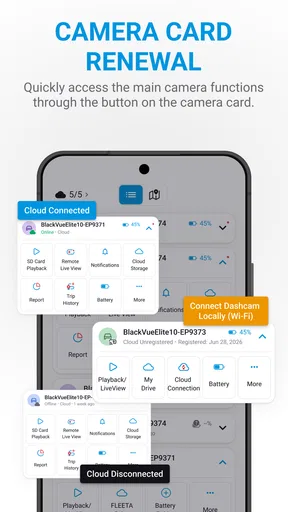
The app’s interface is sleek and modern, with everything you need right at your fingertips. The main screen offers a quick overview of your dashcam status, and you can easily access recorded videos, live view, and app settings. I found the layout to be logical, so there’s no fumbling around trying to find features.
Live view is particularly impressive. You can instantly stream what your dashcam sees in real-time. It’s like having a pair of eyes on the road, even when you’re parked. How cool is that?
Exploring the Features
One feature I absolutely love is the ability to access video footage from anywhere. As someone who often forgets where I parked, being able to check my dashcam’s footage remotely is a lifesaver. Plus, if there’s ever an incident, you can quickly review the footage for peace of mind.
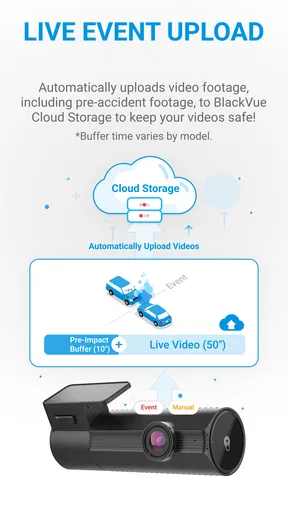
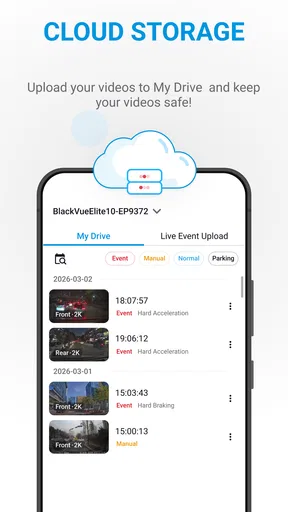
The app also offers cloud storage options. This means your videos are safely stored online, so you don’t have to worry about losing them even if your phone is out of storage. It’s all about convenience and security.
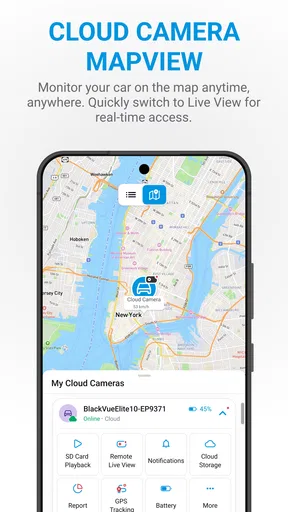
Another handy feature is the built-in GPS tracking. The app logs your driving routes and locations, which is fantastic for keeping tabs on your travel history. It’s like having a personal driving assistant!
Performance and Reliability
During my time with the app, I found it to be incredibly reliable. The connection between the app and the dashcam was stable, and video streaming was smooth without any hiccups. It’s evident that the developers put a lot of effort into ensuring a seamless user experience.
The app updates are regular, which is always a good sign. Frequent updates mean the developers are committed to improving the app and fixing any bugs that may pop up.
Why You Should Give BlackVue a Try
In a world where security and peace of mind are paramount, the BlackVue app delivers. Whether you’re using it to monitor your car while it’s parked or to review your driving performance, it offers a comprehensive suite of features that cater to all your needs.
If you’re someone who values technology that simplifies life, then this app is definitely worth checking out. It’s user-friendly, feature-packed, and reliable, making it a perfect companion for any driver.
So, next time you’re on the road, let the BlackVue app keep an eye out for you. After all, who doesn’t love a little extra security?
What to expect before installing
The app has an average rating of 3.1 from around 8,900 ratings, with roughly 930 written reviews and over 500,000 installs. I read that as a reason to approach it with practical expectations rather than assume every setup will feel effortless. It is free, rated for Everyone, and its current version is 4.20; the minimum operating system is Android 10. It was released on October 19, 2015, so it is an established companion rather than a brand-new experiment, but that alone does not guarantee a smooth experience with every phone and camera combination.
My most useful setup tip is to try the entire journey once while nothing is at stake: connect, open live view, locate a recording, and work out how you would keep or share a clip. Do it while parked, not while driving. If remote access is important to you, test that separately from a nearby connection, because the two situations answer different questions about whether your setup is ready for the moment you need it.
Small habits that make footage easier to use
When a drive matters, I would make a quick note of the time and location before opening the video. That is more reliable than trying to remember details after watching several similar clips. For a vehicle used by more than one person, agreeing on a simple routine—who checks the footage and how a relevant clip is retained—can prevent a useful recording from being overlooked or difficult to find later.
I would also be deliberate about what I do with recordings. A clip may contain faces, license plates, or other people’s movements, so I would share only what is relevant and handle it thoughtfully. The app’s convenience does not remove the need to use dashcam footage responsibly, particularly when sending it beyond the people directly involved.
My overall view is that this is a specialized tool with a clear audience, not an essential download for every driver. If you have a compatible camera and will genuinely use phone access to check its view or find recordings, the workflow can be worthwhile. If your priority is navigation, broad compatibility, or avoiding setup and optional-service decisions, another kind of app—or simply the camera’s basic controls—may suit you better. The best reason to install it is not a promise of effortless security; it is having a familiar, tested path from a BlackVue camera to the footage you need.
Pros
- High-quality video resolution for clear recordings.
- Wide viewing angle captures more of the road.
- User-friendly interface for easy navigation.
- Cloud connectivity for remote access and storage.
- Parking mode with motion detection for security.
Cons
- Higher price point compared to competitors.
- Requires constant internet for cloud features.
- Setup can be complex for new users.
- Occasional app connectivity issues reported.
- Limited support for non-BlackVue accessories.
FAQs for BlackVue
What features does the BlackVue app offer for dashcam users?
The BlackVue app provides a comprehensive suite of features for dashcam users, including live view, video playback, and file management. It also offers cloud connectivity for real-time tracking and remote access to footage. Users can customize settings, receive notifications, and share videos directly from the app, enhancing their dashcam experience.
Is the BlackVue app compatible with all BlackVue dashcam models?
While the BlackVue app is designed to work with a wide range of BlackVue dashcam models, it might not support some older versions. It's advisable to check the compatibility list on the official BlackVue website or app store description to ensure your specific model is supported before downloading the app.
How does the BlackVue Cloud service enhance the app's functionality?
The BlackVue Cloud service significantly enhances the app's functionality by enabling remote live view, real-time tracking, and emergency alerts. Users can access their dashcam footage from anywhere, receive notifications about incidents, and even communicate with the vehicle through the app, making it a valuable tool for security and peace of mind.
Does the BlackVue app require any subscription fees?
The basic features of the BlackVue app are generally free to use. However, advanced functionalities, particularly those associated with BlackVue Cloud services, might require a subscription. It's important to review the pricing plans and terms of service to understand what features are included in the free version versus paid subscriptions.
What are the system requirements for installing the BlackVue app on Android and iOS?
The BlackVue app requires a smartphone or tablet running Android 5.0 or later or iOS 11.0 or later. Adequate storage space is necessary for installing the app and saving video files. Users should also ensure a stable internet connection for cloud services and updates to guarantee optimal app performance.


